OneTwoApps App Ratings & Reviewsscript

A script · App Store Connect and Google Play

The stores forget. Your computer doesn’t.

Google Play shows reviews for seven days only, Apple counts crashes from the day you set it up. This script fetches both to your computer every day (Mac, Linux or Windows) and turns them into a report and a summary to pass on, with an AI of your choice if you like.

1command
2stores
3results
0servers, cloud, tracking
6AI providers, optional, one local
Terminal
~/app-ratings-reviews ❯ ./ratings.sh all Fetch 13 targets · 6 apps · Apple and Google Pocket Gardener Apple reviews ✓ ok 1.4 s 3 new TrailMate GPS Apple reviews ✓ ok 2.0 s 5 new Sleepy Sounds Apple reviews ✓ ok 1.4 s 2 new Quiz Rocket Apple reviews ✓ ok 2.0 s 4 new 1 changed Pocket Gardener Google reviews ✓ ok 1.3 s 2 new Habit Hero Google reviews ✓ ok 1.5 s 1 new TrailMate GPS Apple stability ✓ ok 1.4 s 8 days … 6 more targets AI analysis Anthropic / claude-sonnet-5-5 · new reviews only TrailMate GPS Apple AI analysis ✓ ok 3.2 s 5 analysed 1 draft Quiz Rocket Apple AI analysis ✓ ok 2.8 s 4 analysed summary rebuilt Pocket Gardener Google AI analysis ✓ ok 1.9 s 2 analysed … 10 more apps · 0 requests without new reviews Runtime 25.1 s · 13 targets · 0 errors · 59 new · 1 changed · 1,845 totalAI analysis 11 analysed · 1 draft · 56k tokensReport built → reports/index.html · browser openedMarkdown → reports/markdown/ · 6 files + ZIP

The report · 7 minutes · German narration, English subtitles

From the first warning sign to the line of code.

Ten invented insurer apps, one shared code base, one app on red. The film plays the case through once: overview and traffic light, what the charts show, the competition side by side, questions to the AI and finally the crash analysis. Subtitles can be switched at the bottom right.

At a glance

Twenty things the script does for you.

In four groups: what the script fetches, what the report makes of it, what you pass on and what you can add. Click a tile to see what is behind it.

Fetch and keep

  • Apple and Google in one run

    App Store Connect and Google Play Developer API, one command, one data store.

  • Ratings and reviews, without gaps

    Every run adds, nothing is ever deleted. Google's seven-day window no longer matters.

  • Crashes and sessions

    Crash rate per 1,000 sessions, by day, version, iOS version and device. Apple; planned for Google.

  • Store figures

    Downloads, installs and deletions, store views, day by day. Apple; planned for Google.

  • Runs daily on its own

    ./ratings.sh daily via cron or GitHub Actions. Running it several times a day is safe.

  • Several customers, many apps

    Apps grouped by customer, report and summaries per customer or across everything.

  • Local and confidential

    No server, no cloud, no user names. Keys only from environment variables, files readable by you alone.

  • Setup in the browser

    ./ratings.sh admin: every setting as a plain-language question, checked at once, saved with a backup. The three AI models too, and which tabs the report shows. More.

Evaluate in the report

  • Report in the browser, one file

    A self-contained HTML page that works offline, light and dark, German and English.

  • Traffic light per app

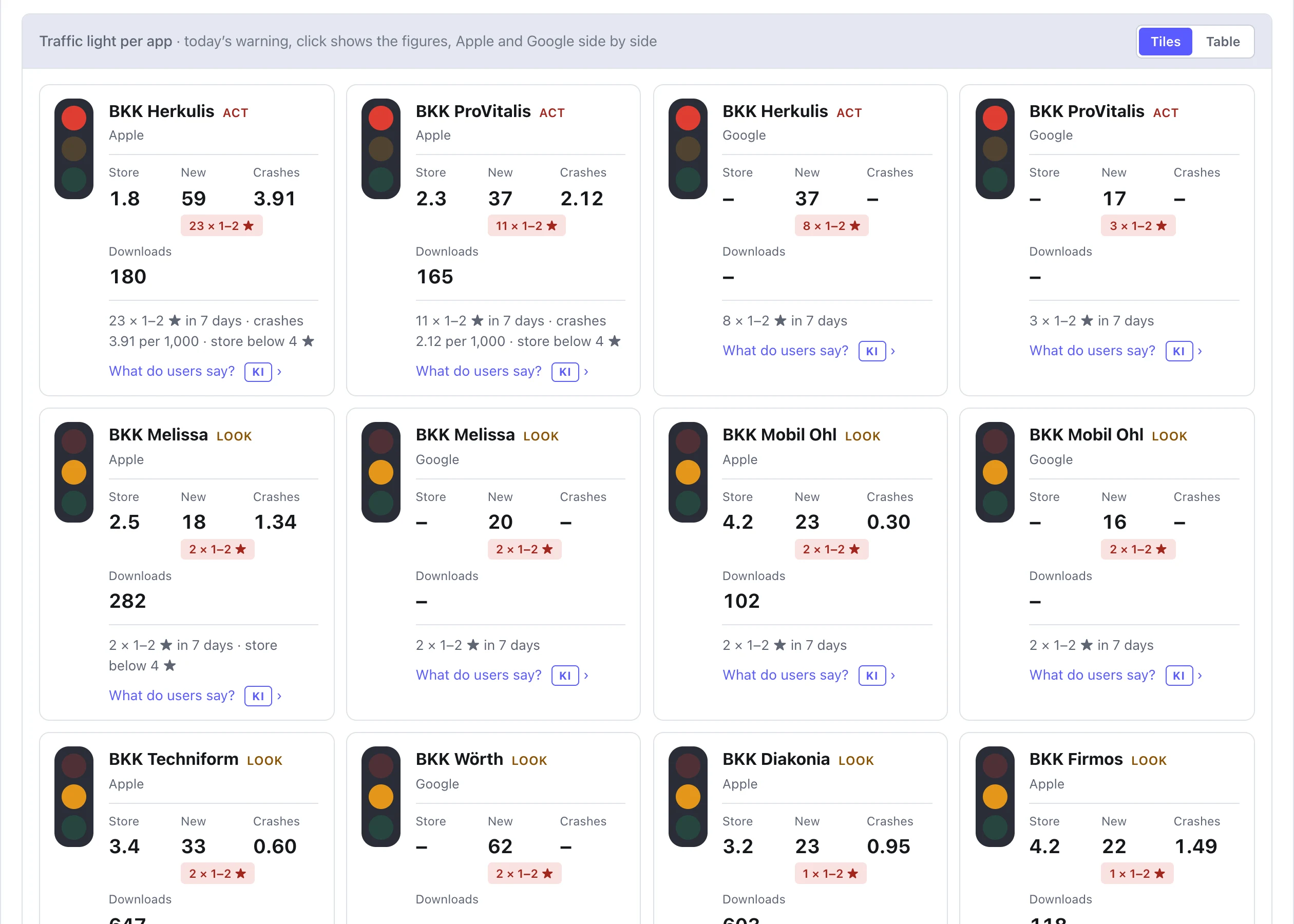
    Red, yellow, green from new 1–2 star reviews, crash spikes and the store rating. As tiles or a table; a click shows Apple and Google side by side.

  • Filter by customer, app, platform, period

    Everything below the filter follows your selection, including the AI texts.

  • Charts

    Nineteen charts, from “All apps at a glance” to “How fast do updates arrive?”, each explaining what it is for.

Pass on

  • Print and copy reports

    Monthly report, each tab on its own or everything at once: as PDF or to the clipboard for Word, Teams and Jira.

  • Summaries to pass on

    One Markdown file per app for the last 14 days, an overview of all apps and a ZIP to send.

  • As a web page for your company

    Serve the report by URL: a folder on any web server is enough, no service required.

Optional

  • AI analysis, optional

    Three sentences per app, sentiment, measures, reply drafts. Five cloud providers with your key or a local model (Ollama, LM Studio) without one; off until you switch it on. More.

  • Ask the data

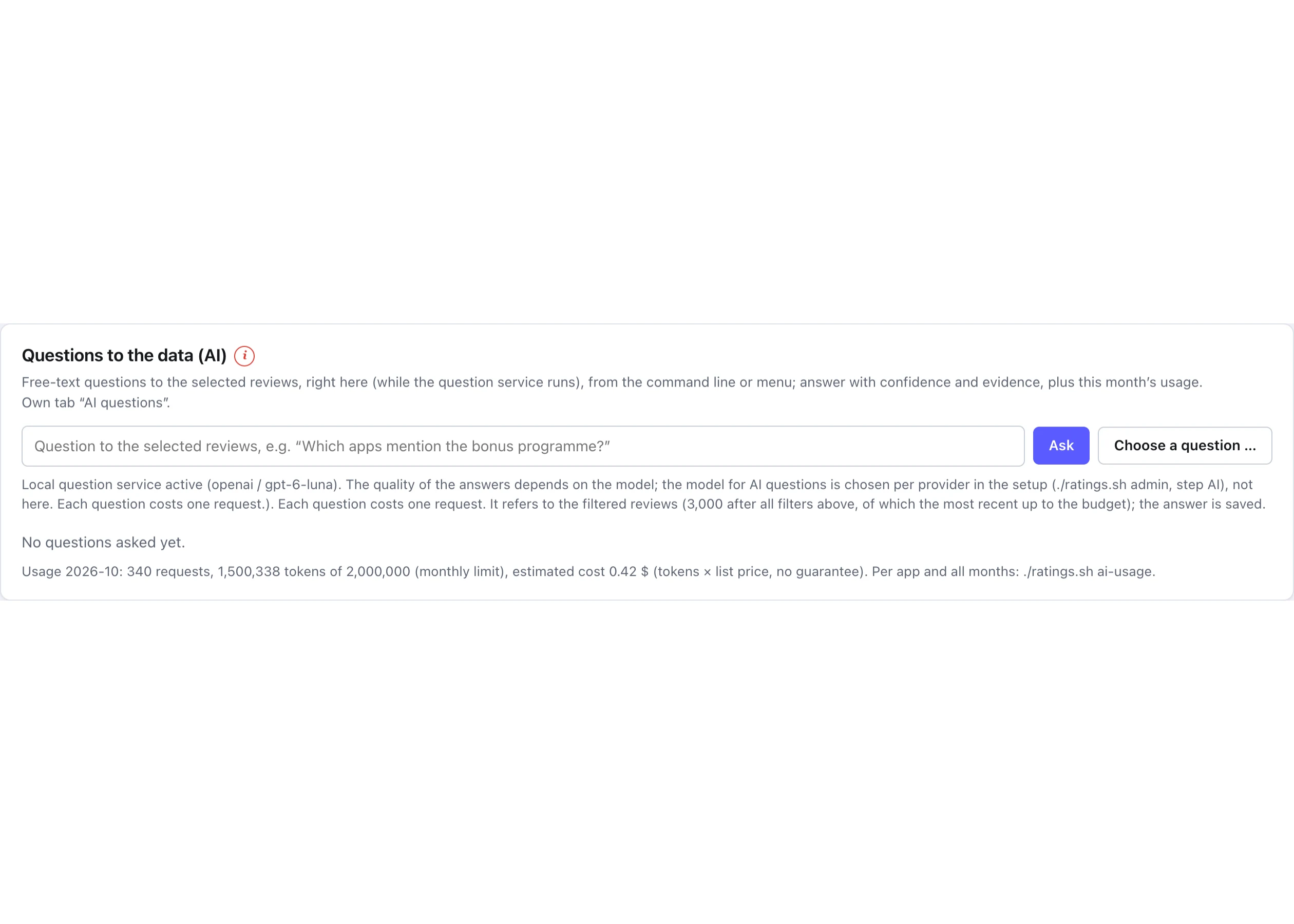
    Free-text questions about the reviews, answered in seconds with quotes as evidence, locally only. More.

  • AI crash analysis, new

    Crash reports from Apple and Android: cause, location and fix with evidence, personal data replaced beforehand, known crashes never twice. More.

  • Notifications, optional

    E-mail, Slack or webhook on new 1–2 ★, traffic-light changes or crash spikes. Each incident once. More.

  • Competitors next to yours, Apple only

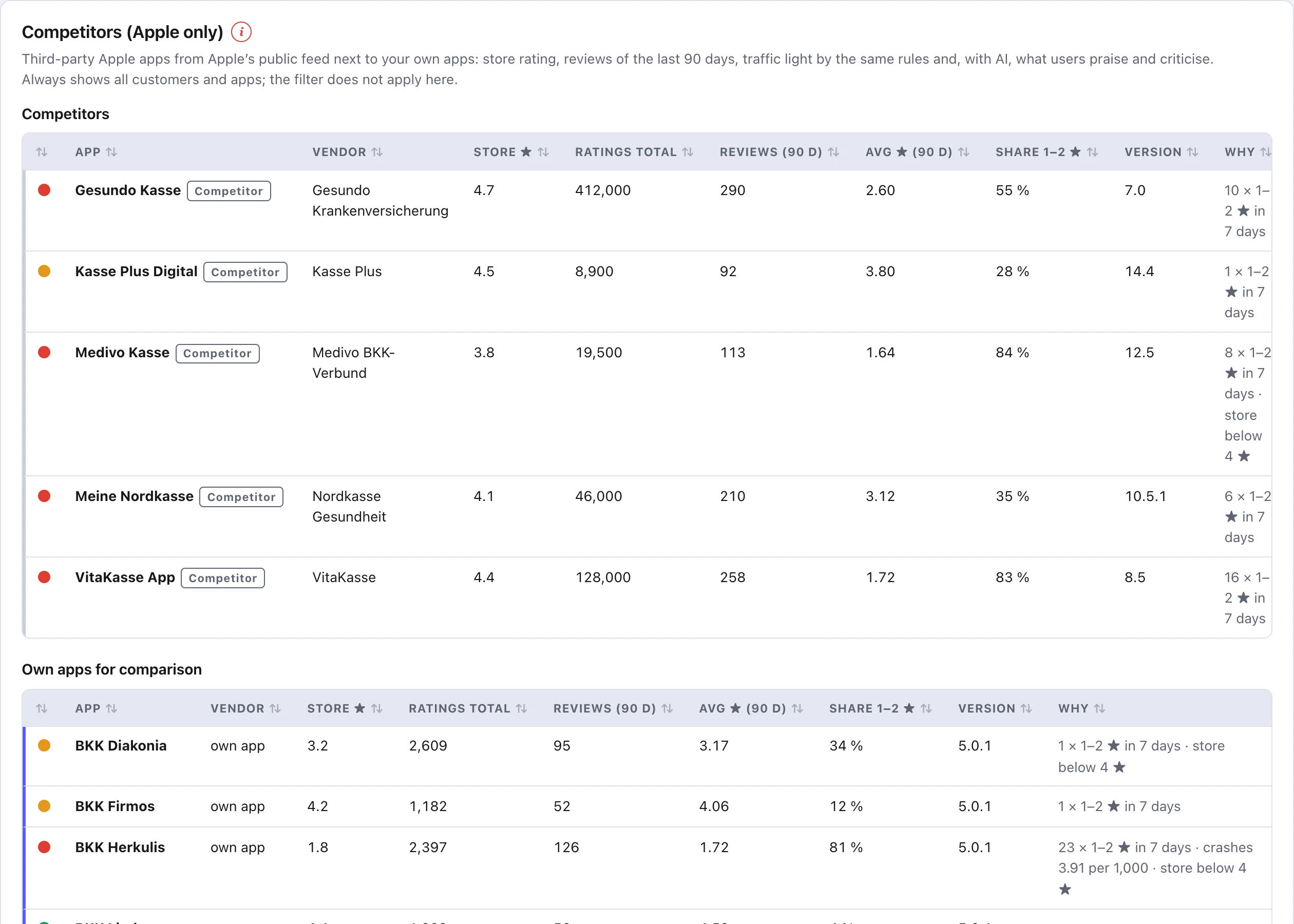
    Third-party Apple apps from Apple’s public feed with the same traffic light and AI, no credentials, in a tab of their own and kept apart from your figures. Only if you list some. More.

The gap

What the stores show you, and what stays on your computer.

The same 120 days, three times. Each bar is one day with data.

Google Play APIreviews of the last 7 days
120 days ago113 days gonetoday
Apple Analyticscrashes only from setup on
120 days agoset uptoday
With the scriptfetched daily, kept locally
120 days ago120 of 120 daystoday

That is why daily. The script remembers per app when the last fetch succeeded and only collects what is new the next time. With ./ratings.sh daily it runs by itself via cron or GitHub Actions.

App Store

App Store Connect API · Apple Analytics

What Apple provides
Reviews from every country with the developer's reply, the official store rating per country, plus sessions and crashes per day, version, iOS version and device.
What Apple keeps from you
Reviews carry no app version and no device. Very small data sets are hidden entirely.
What the script makes of it
A crash rate per 1,000 sessions you can place next to the negative reviews week by week. And a history that never breaks off again after your first fetch.
Google Play

Google Play Developer API · CSV import

What Google provides
Reviews with app version, device and Android version, with language and the developer's reply. More context per review than Apple.
What Google keeps from you
Anything older than the window above is only available through the Play Console CSV export.
What the script makes of it
A daily fetch with overlap that recognises duplicates. Older reviews are imported once from CSV, after that it runs by itself.

An example

One update, two signals, seven weeks.

TrailMate GPS, autumn 2026. This is what it looks like when crashes and reviews share one picture.

Week 3 · version 3.0

The crash rate jumps

After the update the rate climbs from 3.3 to 17.47 crashes per 1,000 sessions. You see it in the report the next morning, not in the next quarterly review.

Weeks 3 to 5 · reviews

The reviews turn

Negative reviews pile up in exactly the same weeks. The weekly chart lays both on top of each other.

“Since 3.0 the app closes every time I open the map.”
Stability by device

Narrowing down the cause

The tables by version, iOS version and device show: iPhone 3.9, iPad far more. The problem sits in the map view on the iPad.

Week 5 · version 3.0.1

The fix works, and it is in writing

The Markdown summary of the next 14 days proves it: 2.90 per 1,000 sessions, average stars from 3.67 to 4.00. That is the file you send to the client.

“Map works again on iPad. Thanks for the quick update.”
TrailMate GPS · Appleweekly
09-0709-1409-2109-2810-0510-1210-19 3.0 iPad 3.0.1 17.47 2.90
crashes per 1,000 sessionsnegative reviews (1–2 ★)

One command, three results

What is on your computer after ./ratings.sh all.

Everything is a file. You can open, copy, send or archive it.

01

The report in the browser

A single HTML file that works offline. Stars, distribution, trend, versions side by side, stability per device, and every review in full text with filters for app, country, language, stars and period. Export as CSV or JSON.

reports/index.html
02

The summary to pass on

One Markdown file per app and store covering the last 14 days: figures against the previous period, stars, stability and the new reviews. Pastes into Mail, Slack or a wiki without losing its formatting.

reports/markdown/trailmate-gps-apple.md
03

The overview and the ZIP

An overview of all apps in one table, linking to each app's file. Plus a ZIP with all summaries, ready to send to colleagues or clients.

reports/markdown/uebersicht.md · markdown.zip

Print and clipboard

One click, and management has a page to print.

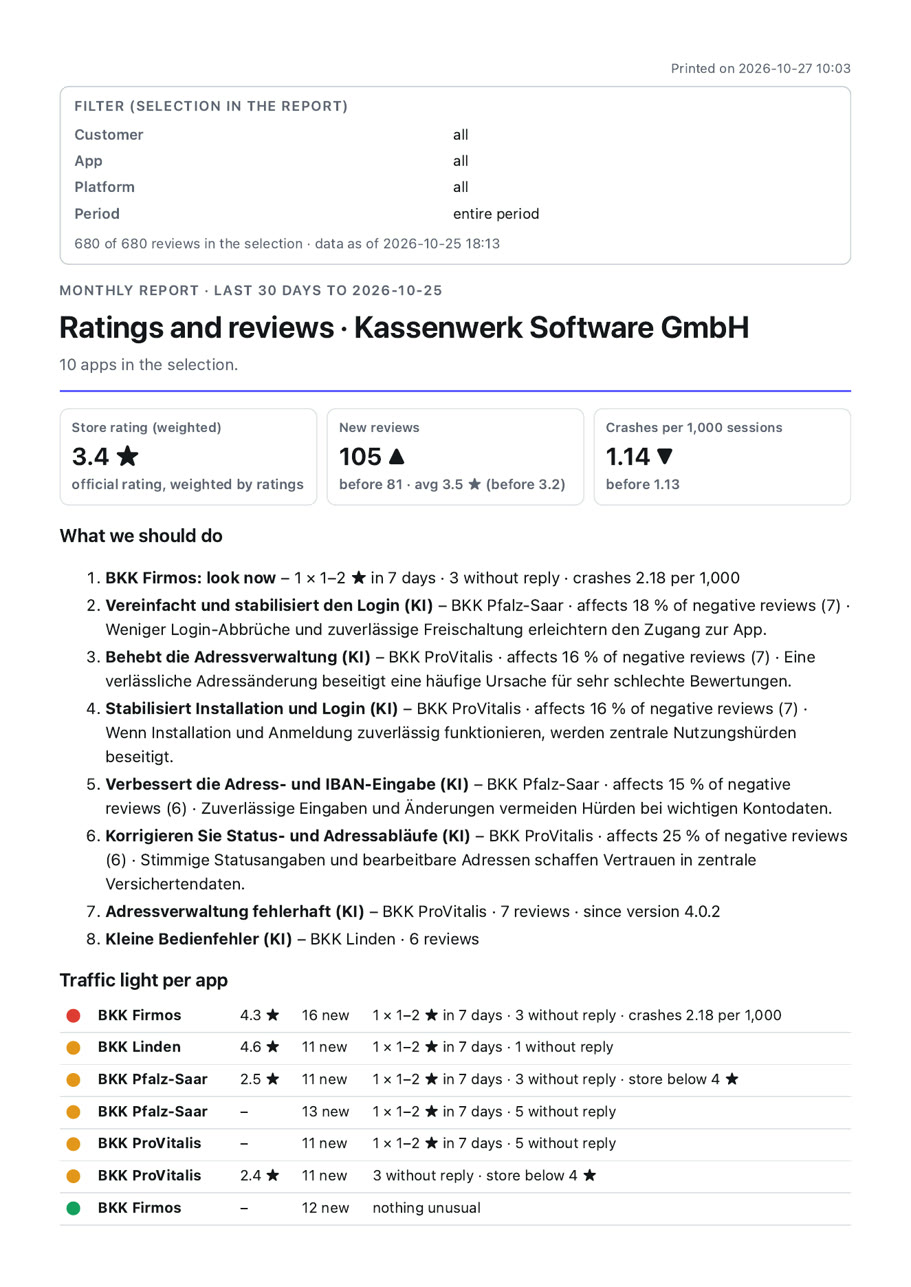
Every tab of the report has a pair of buttons at the top: “Print report” and “Copy to clipboard”. In the overview the printout is the monthly report; next to the filter there is the full report across all tabs. Every printout starts with date, time and the filter in use; the clipboard delivers the same report with formatting for Word, Outlook, Teams or Jira.

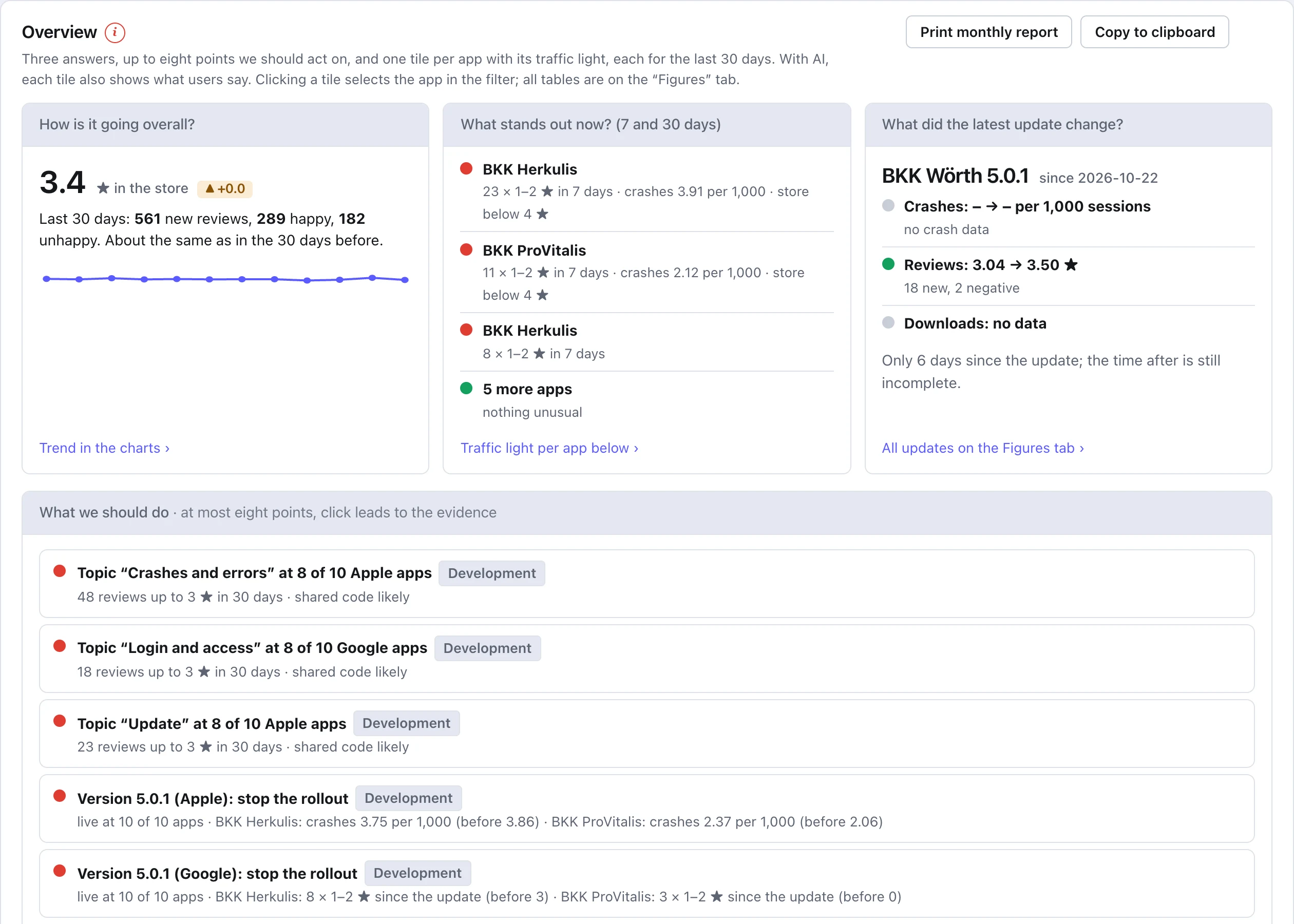
First page of the monthly report: store rating, new reviews, crashes, traffic light per app and “What we should do”
  • The situation in three figures: store rating, new reviews against the 30 days before, crashes per 1,000 sessions.
  • Traffic light per app with one sentence on why it is red, yellow or green.
  • What we should do: the most important items (five by default, adjustable up to 16), each with evidence.
  • With AI: what users praise and criticise per app.
  • The footer names the sources and the data status, so nobody passes on figures without their origin.
  • The same for every tab: topics, stability, downloads & store, ten charts, AI questions, AI crash reports and data status, one by one or as a full report. The PDF file name carries report, selection, date and time.

The demo shows invented sample data. The AI texts are in German because the sample reviews are in German.

Real screenshots

What the report looks like.

Excerpts from the finished report, shown here with sample data. Swipe, use the arrows or the ← and → keys; a click enlarges the image.

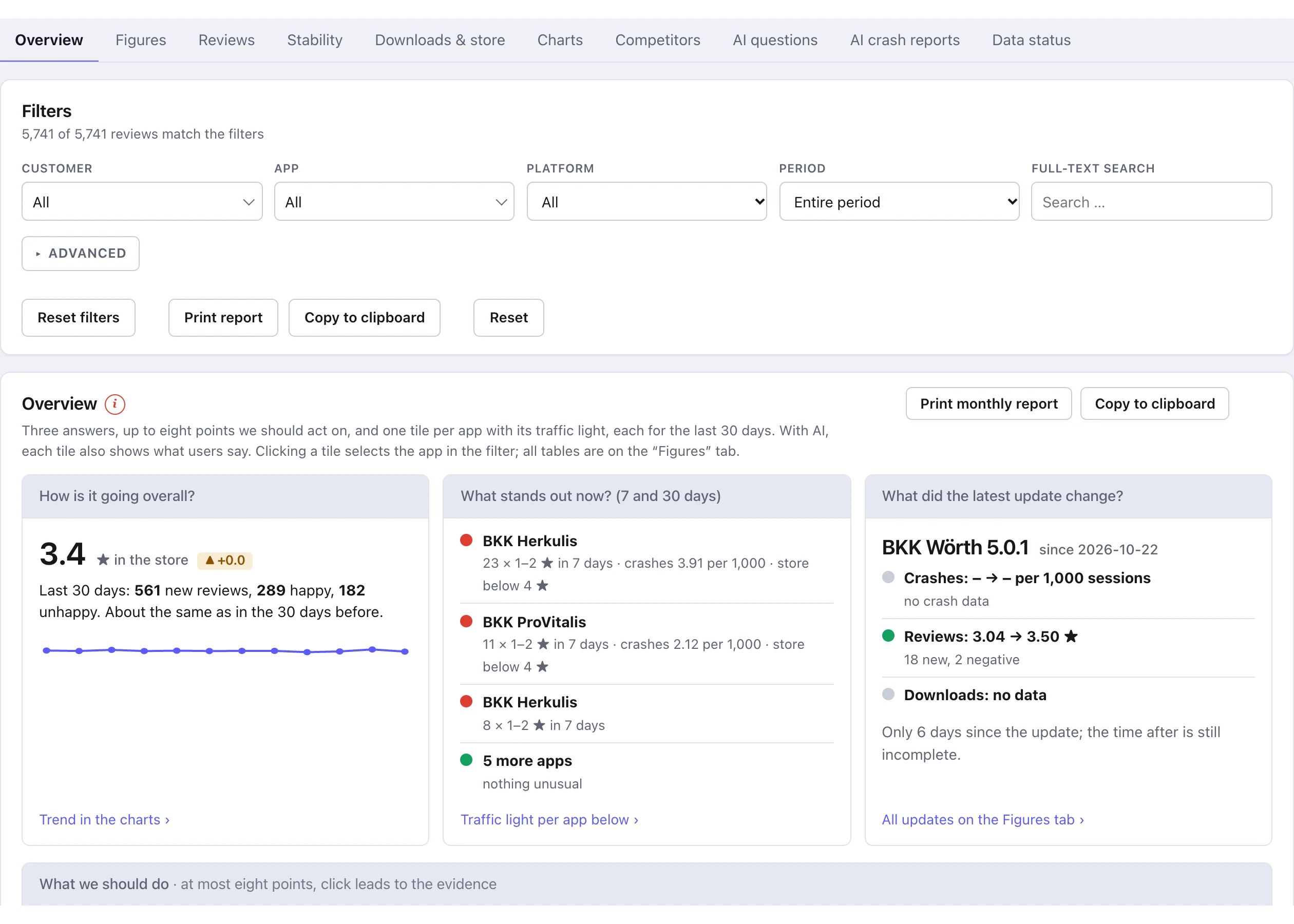
  • Tabs and filter: customer, app, platform, period and free text – everything below follows the selection
    Tabs and filter: customer, app, platform, period and free text – everything below follows the selection
  • Overview: three answers and the points to act on
    Overview: three answers and the points to act on
  • Traffic light per app: today's warning, as tiles or a table
    Traffic light per app: today's warning, as tiles or a table
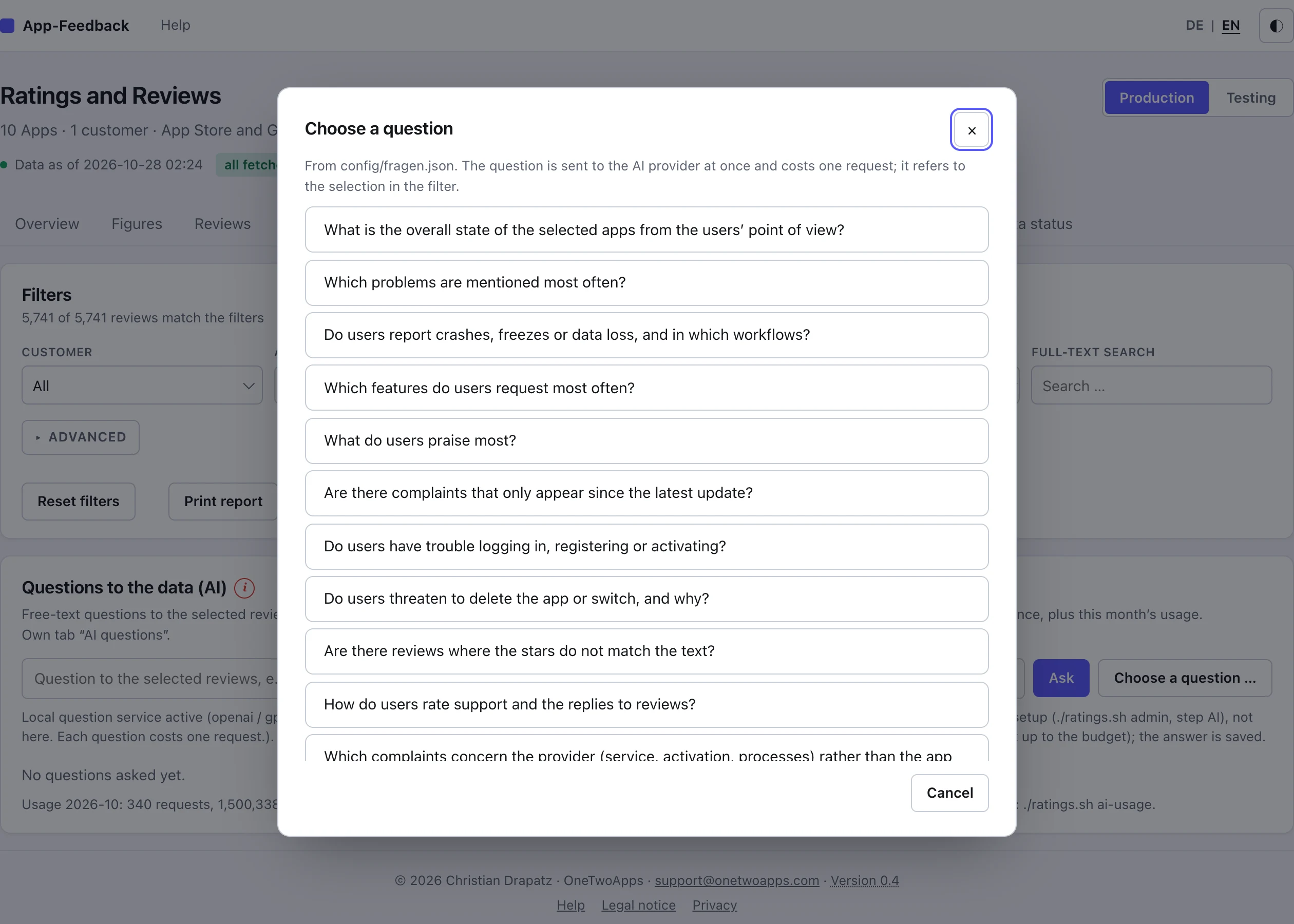
  • AI question: ready-made questions to choose from
    AI question: ready-made questions to choose from
  • AI question: answer with confidence and evidence from the reviews
    AI question: answer with confidence and evidence from the reviews
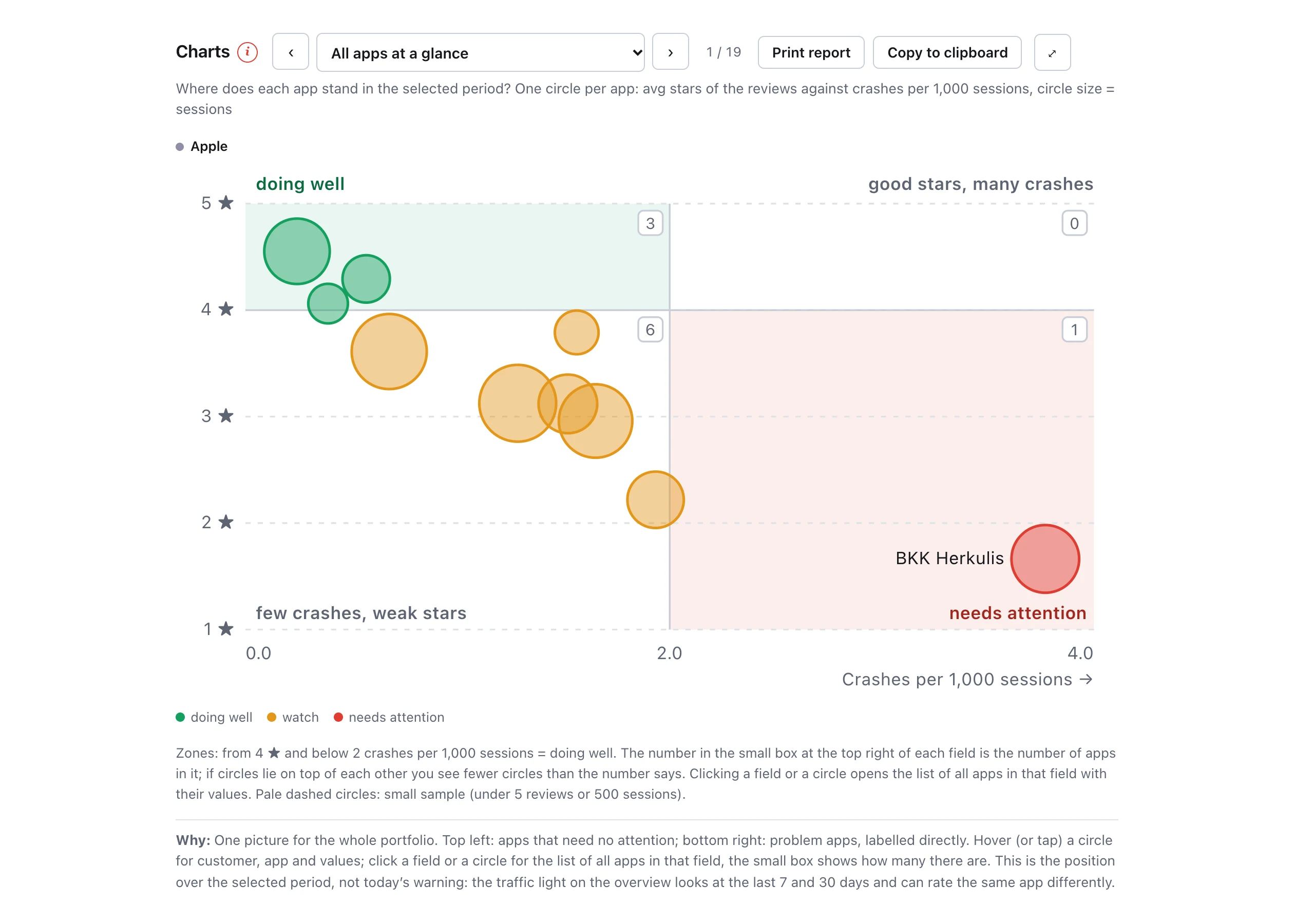
  • All apps at a glance: stars against crashes
    All apps at a glance: stars against crashes
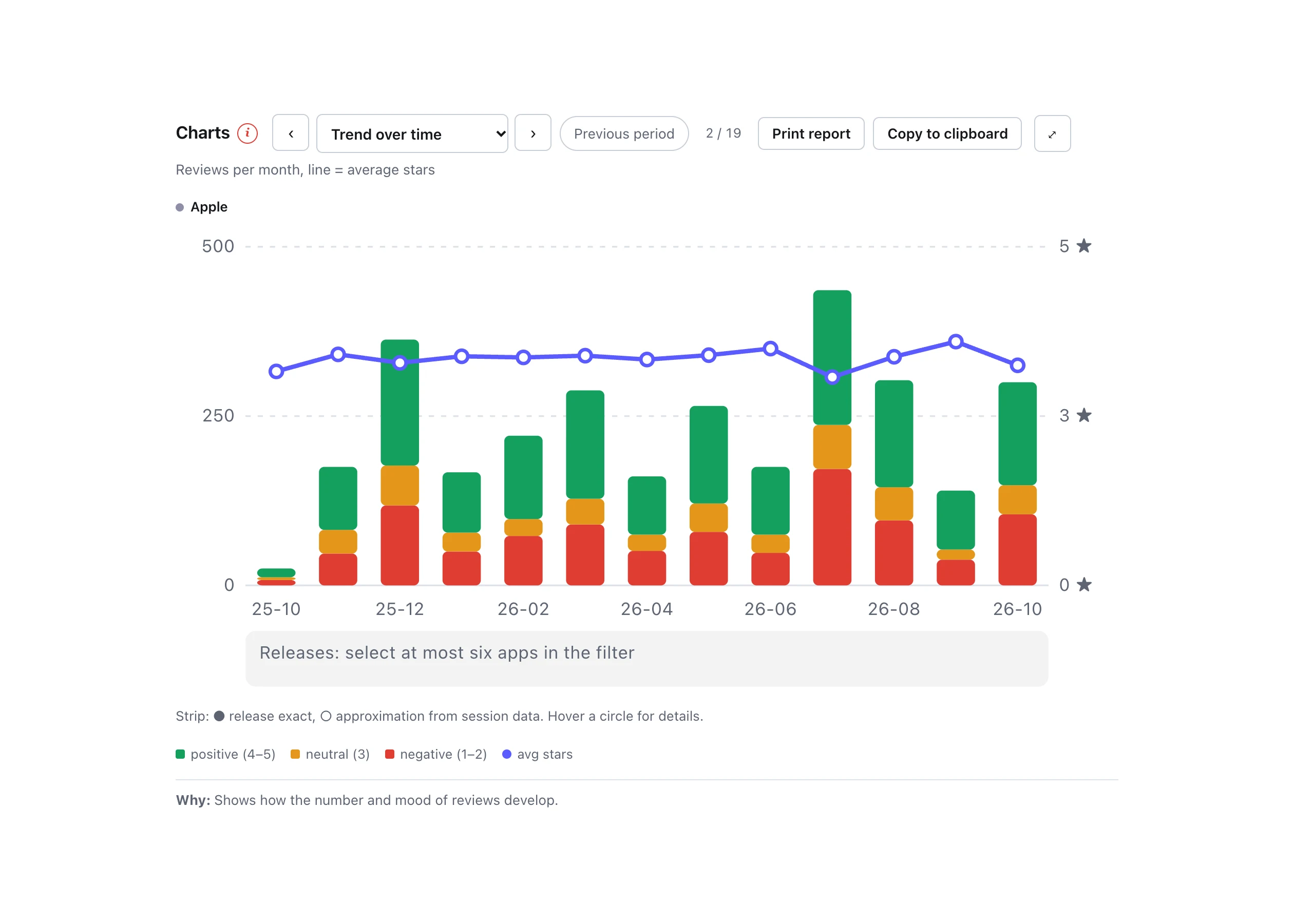
  • Trend over time
    Trend over time
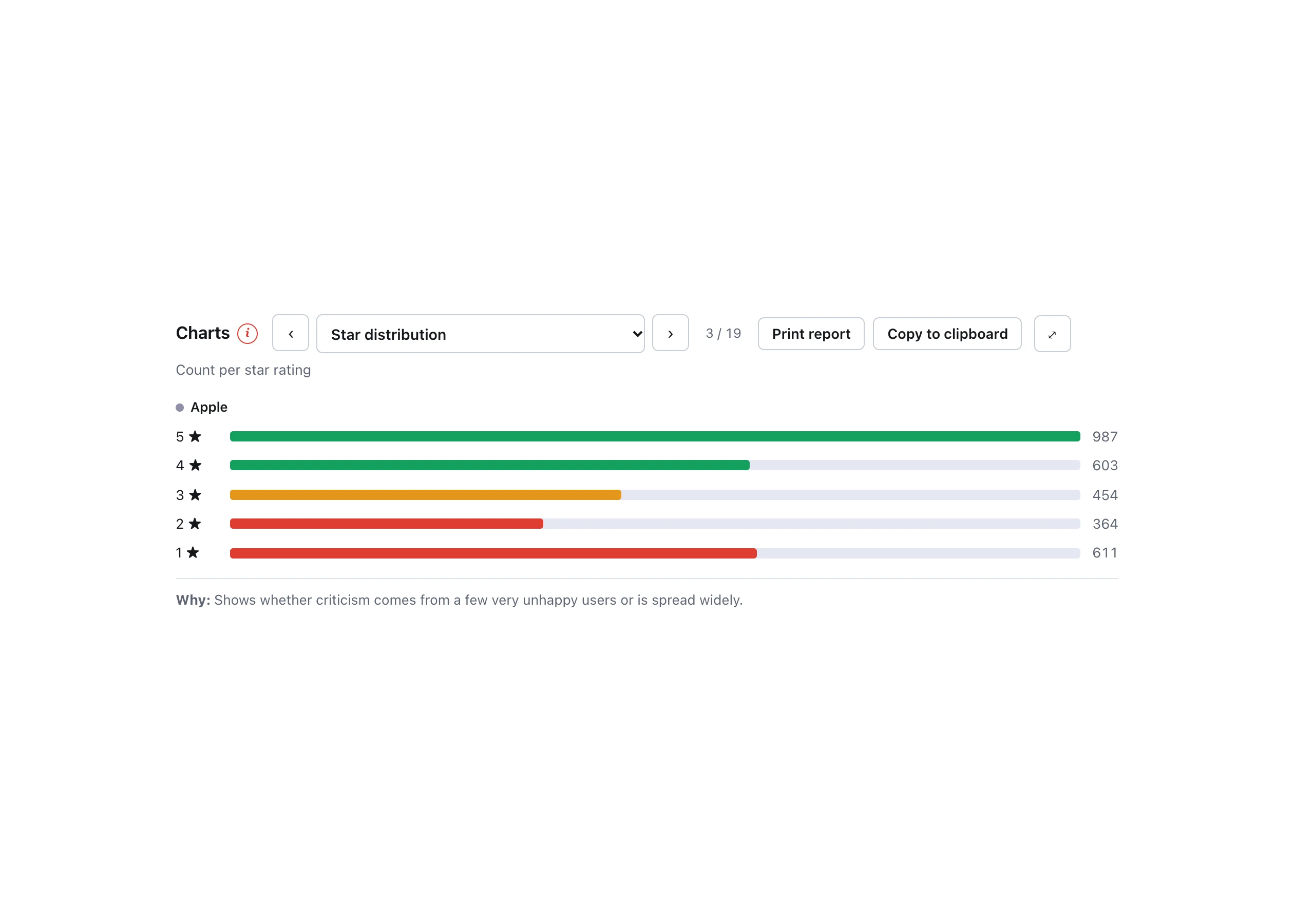
  • Star distribution
    Star distribution
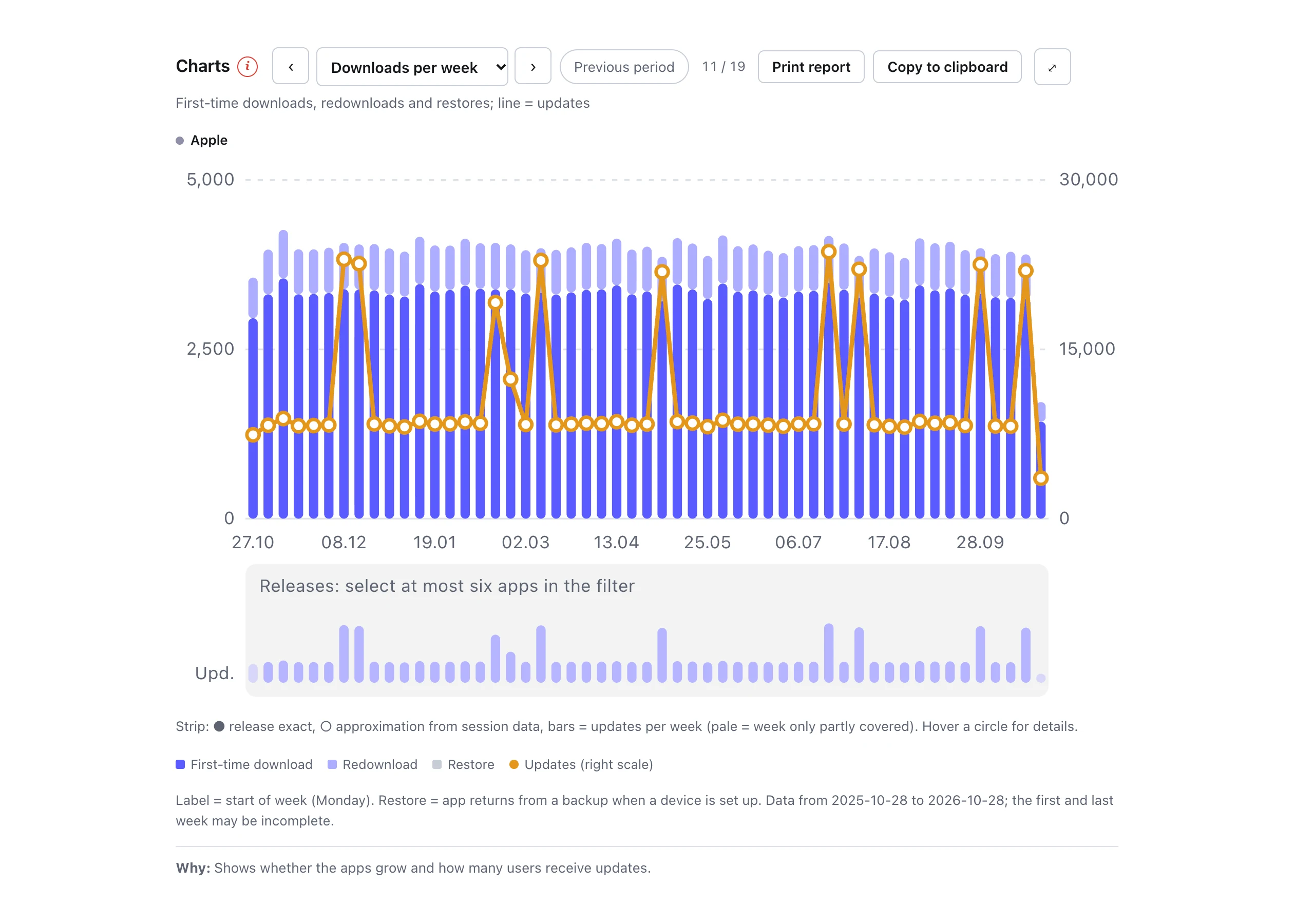
  • Downloads per week
    Downloads per week
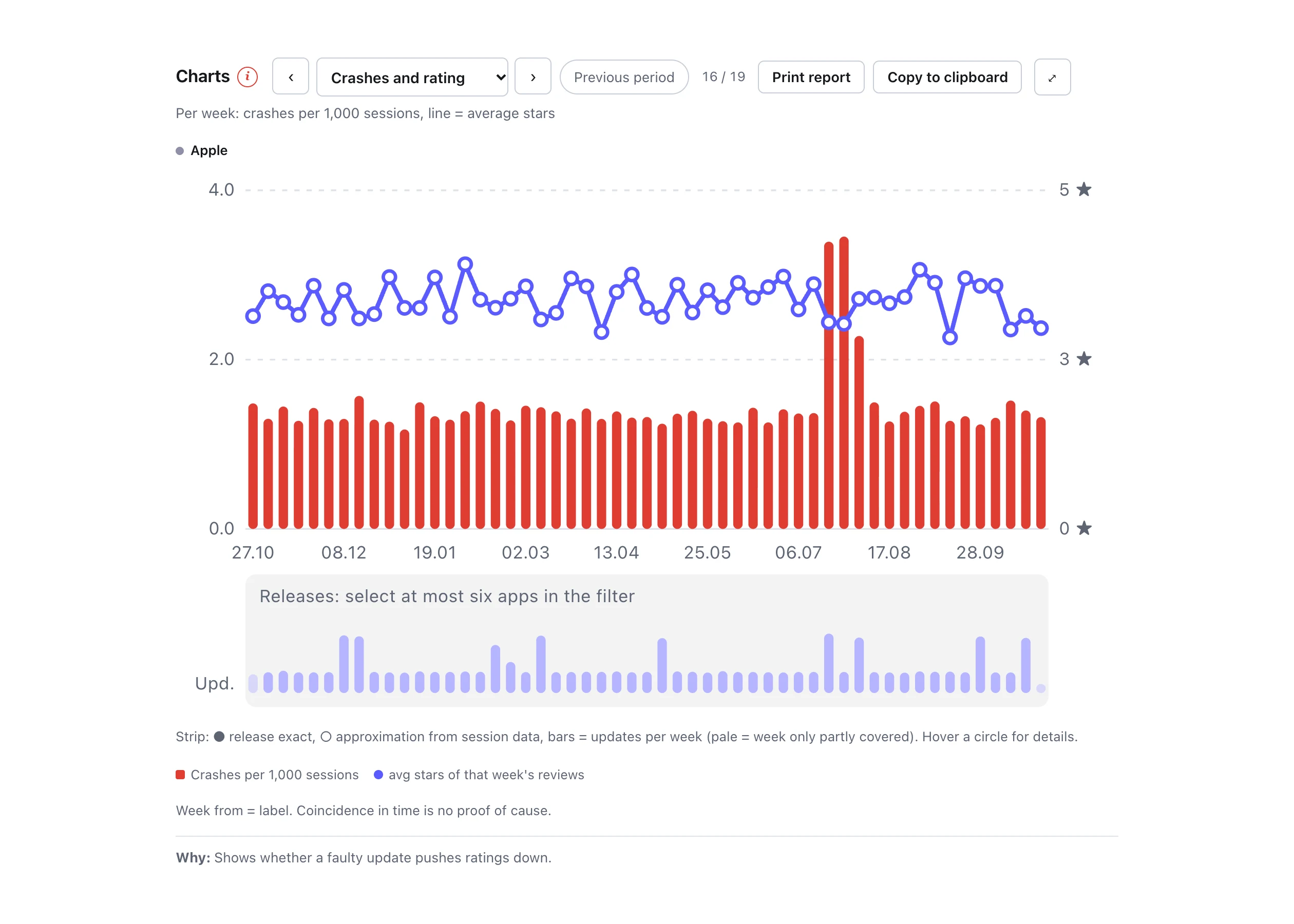
  • Crashes and rating: a faulty update pushes the stars down
    Crashes and rating: a faulty update pushes the stars down
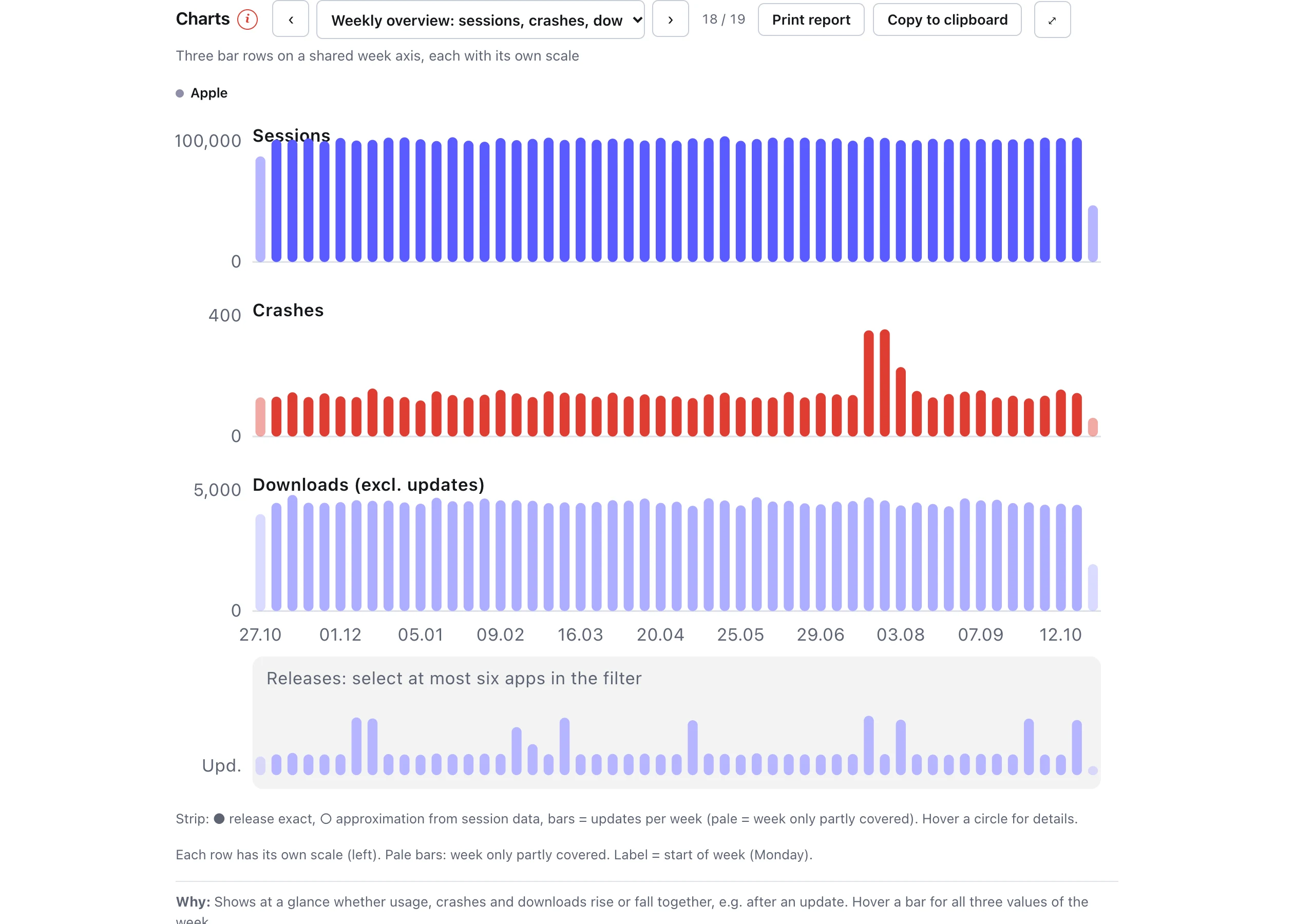
  • Weekly overview: sessions, crashes, downloads
    Weekly overview: sessions, crashes, downloads
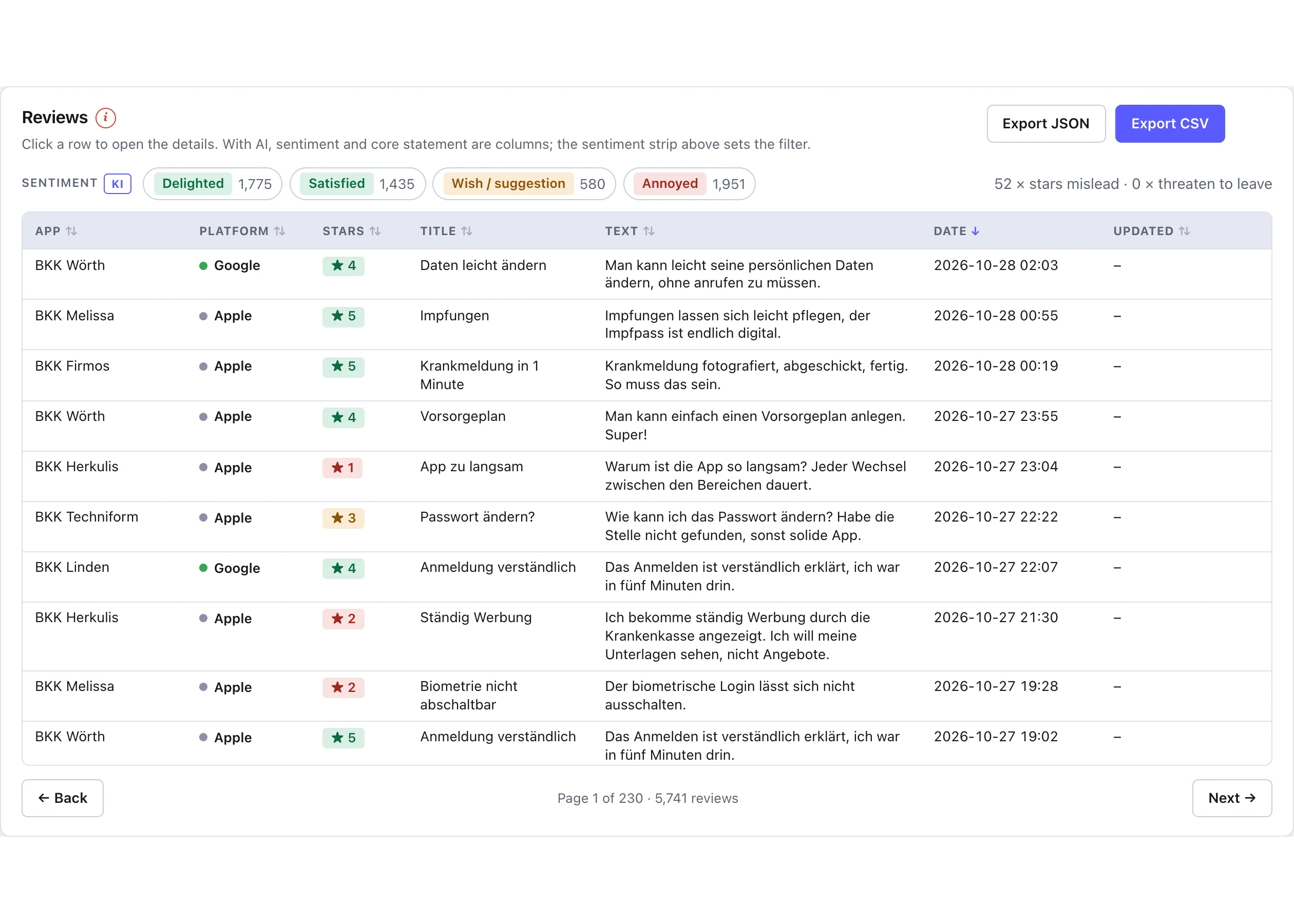
  • Reviews: list with filter, search and sorting
    Reviews: list with filter, search and sorting
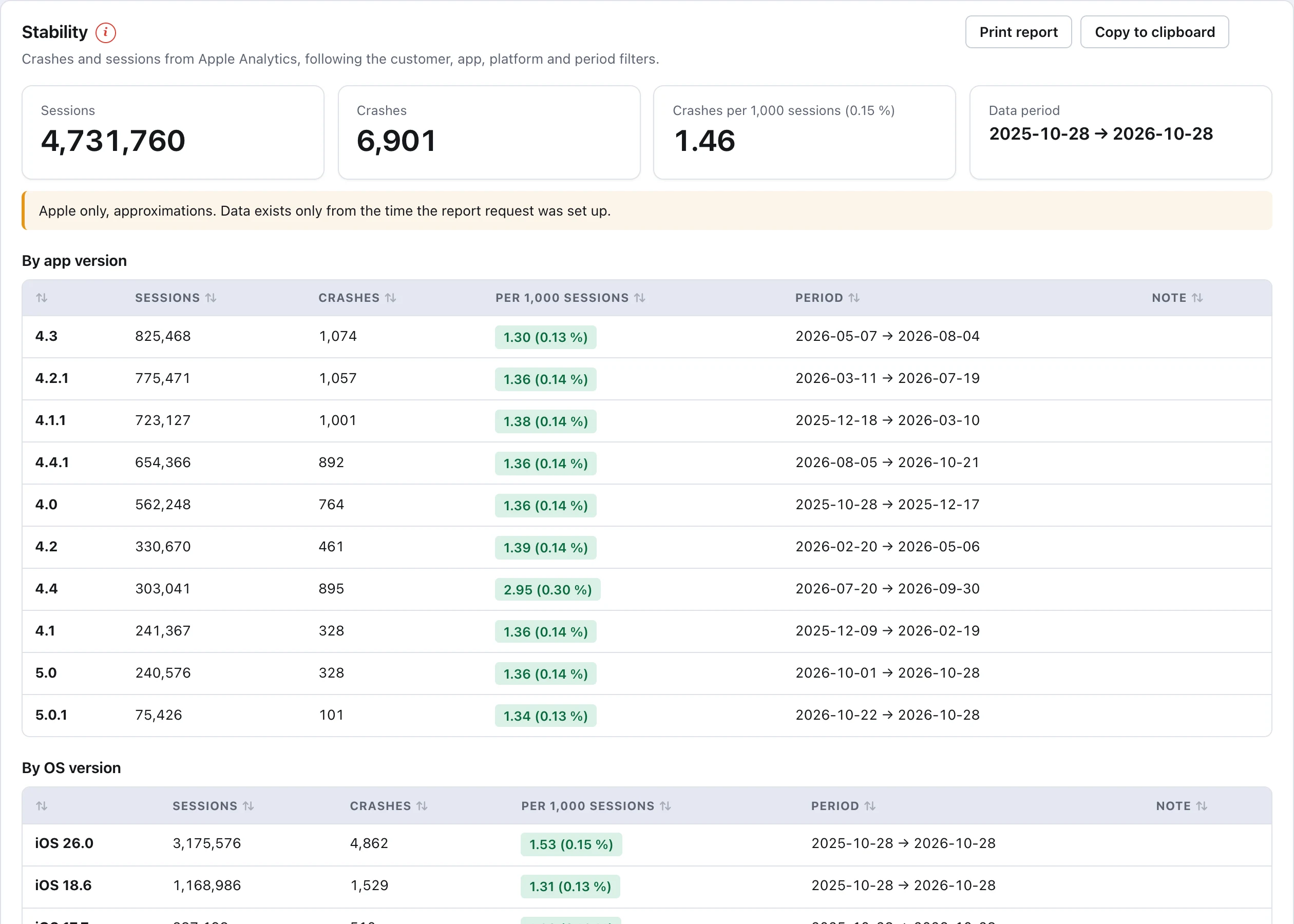
  • Stability by version, system and device
    Stability by version, system and device
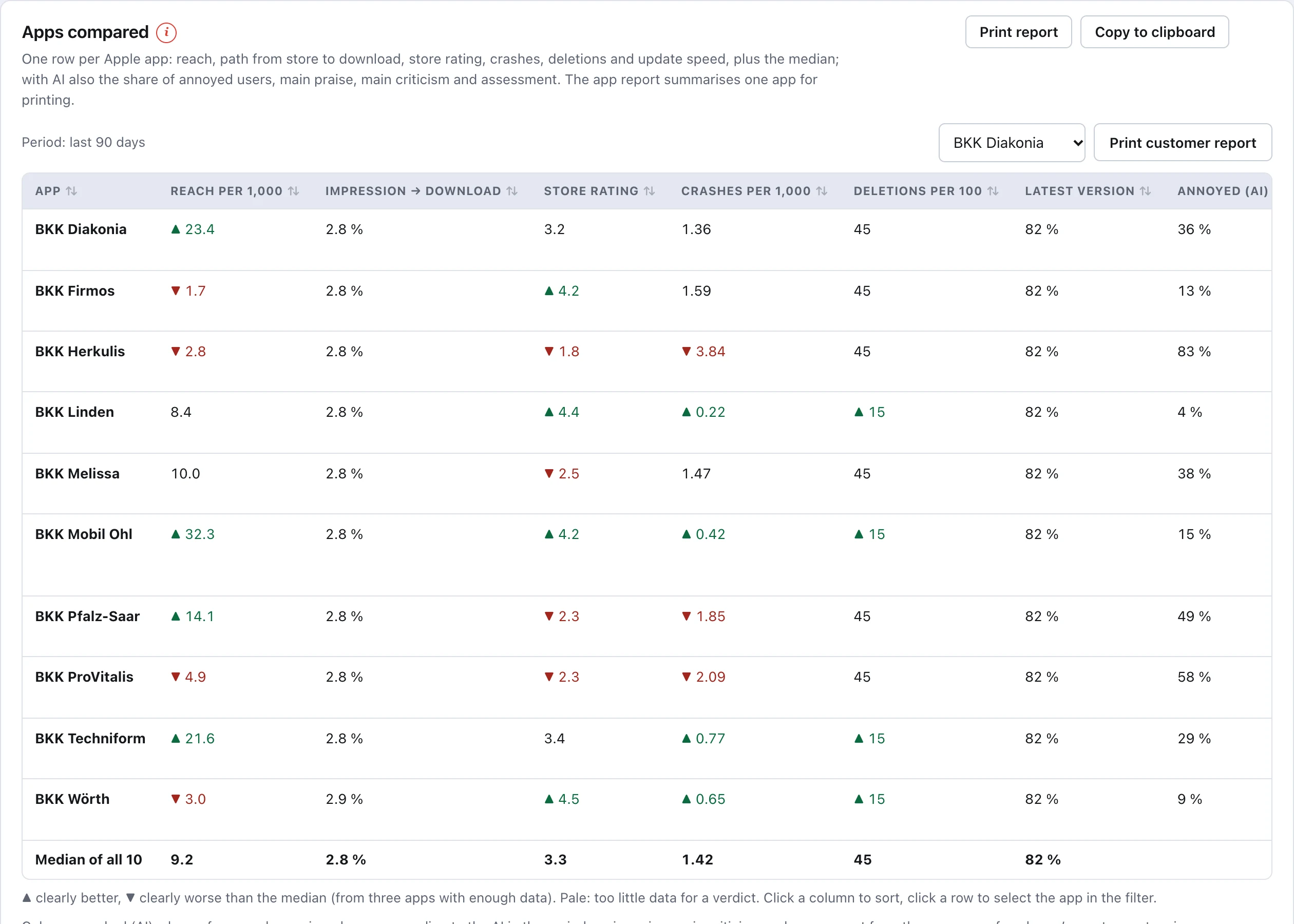
  • Apps compared: store rating, downloads and views
    Apps compared: store rating, downloads and views
  • Competitors: third-party apps on top, your own below for comparison
    Competitors: third-party apps on top, your own below for comparison
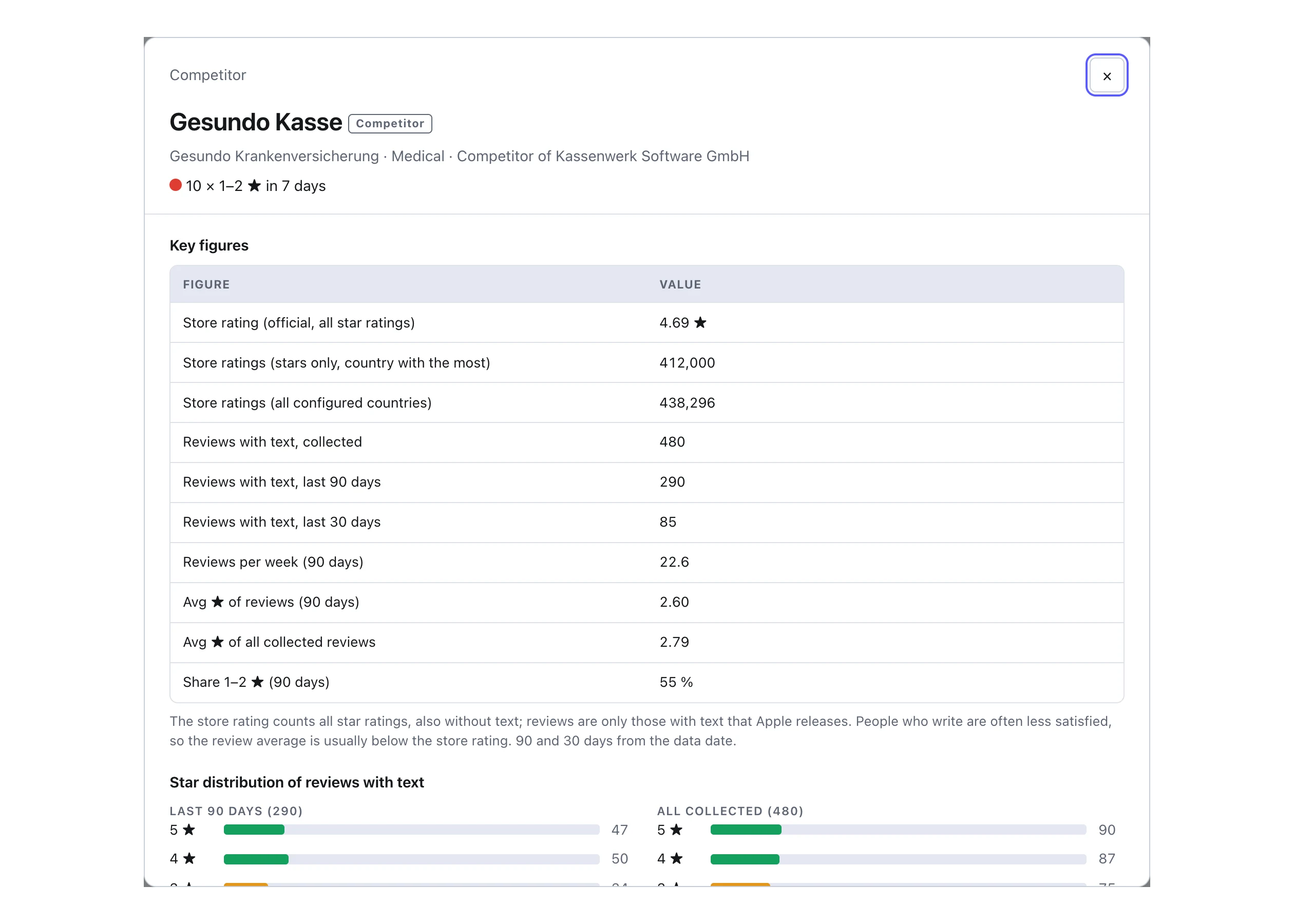
  • One click on a row: every figure of the app from public sources
    One click on a row: every figure of the app from public sources
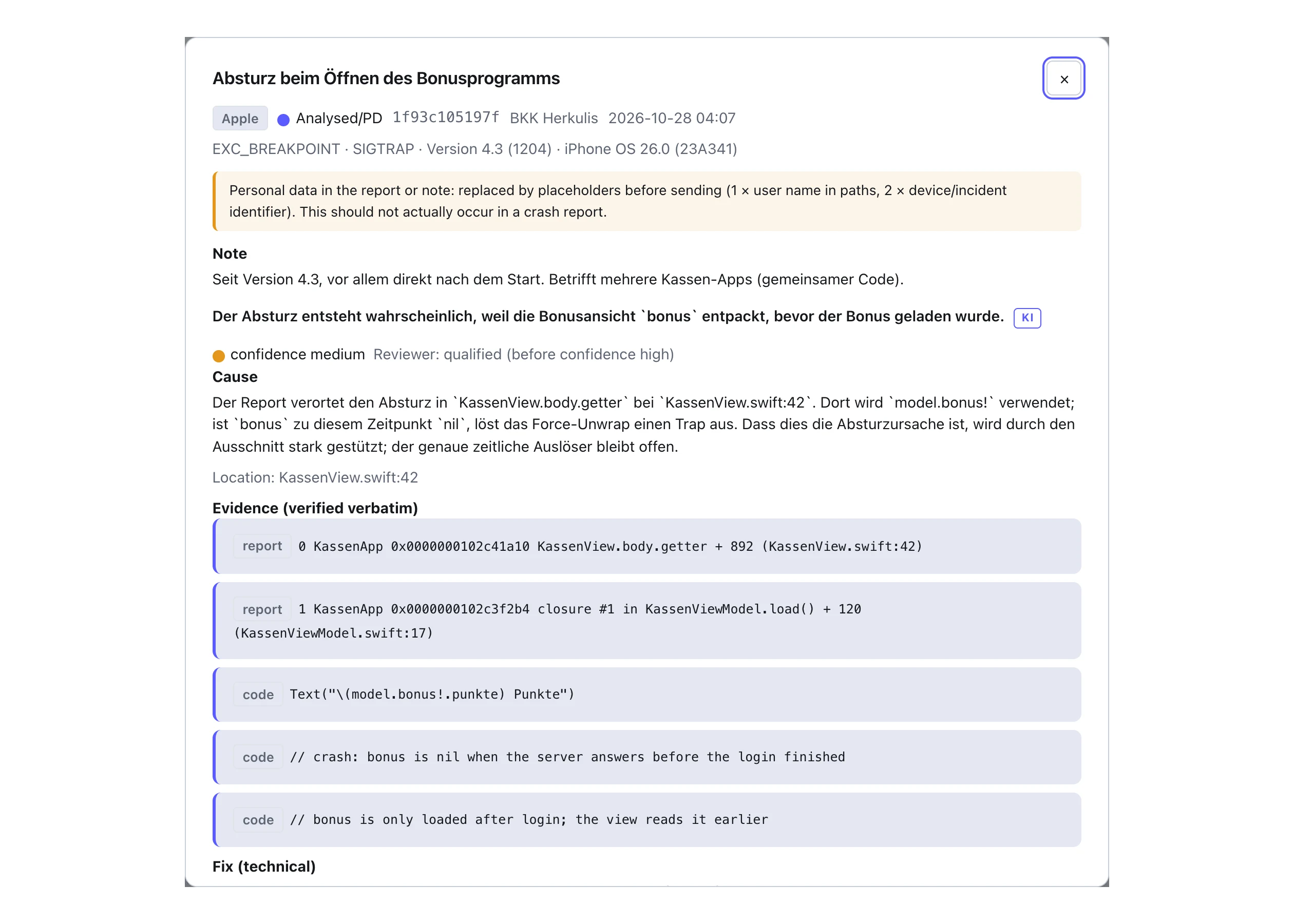
  • AI crash reports: cause, place in the code and fix, with evidence
    AI crash reports: cause, place in the code and fix, with evidence
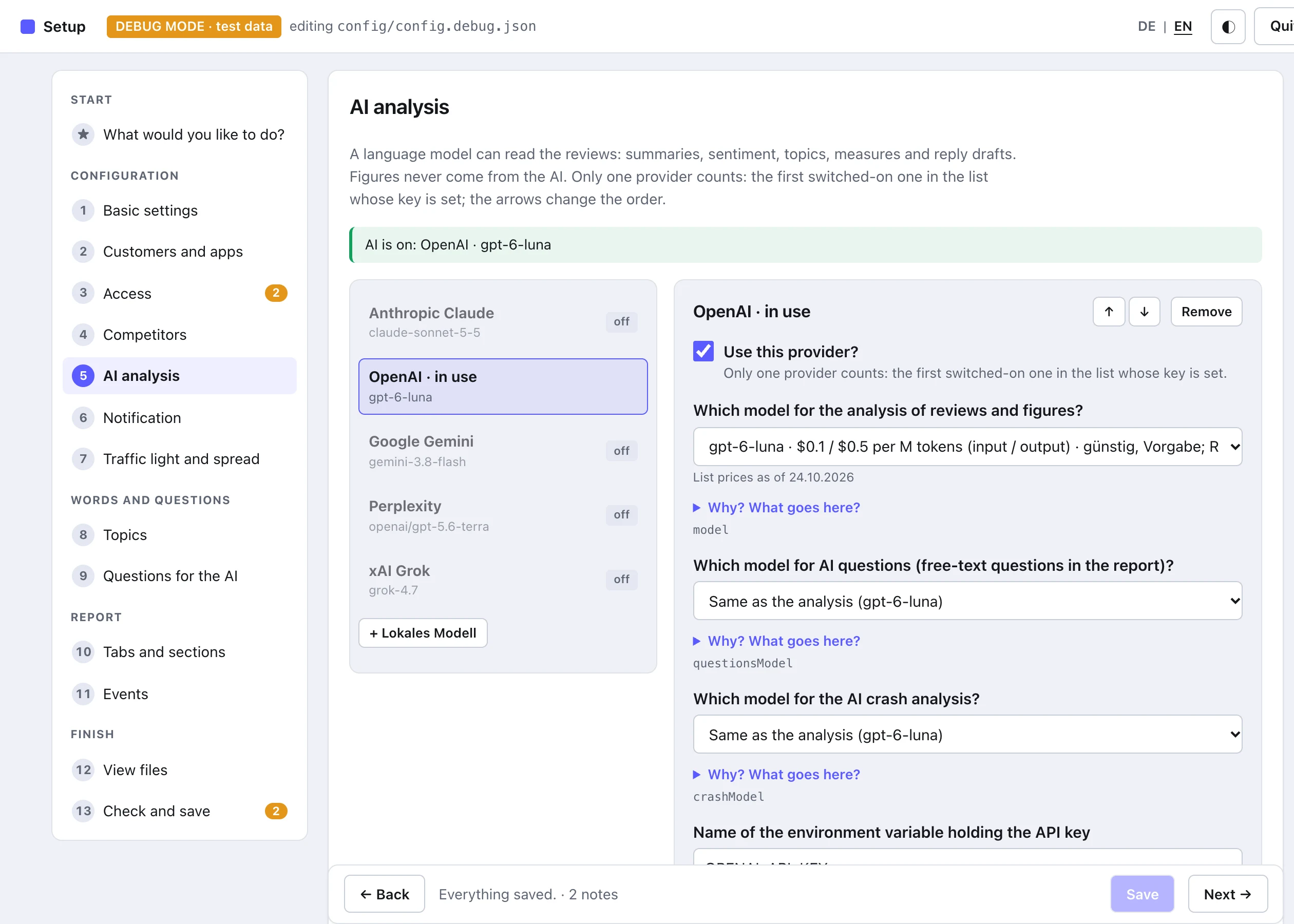
  • Setup in the browser: every setting as a question, checked at once
    Setup in the browser: every setting as a question, checked at once

Nineteen charts in four groups (overview, ratings, downloads and store, stability and usage), all follow the filter and open large. Plus reviews per app, topics, replies, versions, operating systems, devices, downloads per week, installs and deletions, countries, download sources, from store listing to download, sessions and crash rate by version and device. The “Previous period” button overlays the period before as a dashed line; recorded events such as a campaign, outage or release appear as markers.

Optional · AI in three tools

The numbers show that something is wrong. The AI tells you what. And why the app crashes.

Nobody reads hundreds of reviews every morning, and not everybody understands a stack trace at first sight. A language model of your choice takes over both, in three separate tools with a model each. It is off until you switch it on, and it never gets the people behind the data.

1 · Analysis of reviews and figures

Three sentences per app with praise, criticism and assessment, backed by verbatim quotes. Plus “What we should do” with the most important points (five by default, adjustable), the mood behind the stars, the effect of every update, most requested features and reply drafts. Runs with the fetch; a cheap model is enough.

2 · AI questions

“Are there complaints that only appear since the latest update?” Type the question in the report or pick one of twenty ready-made ones. The answer comes with confidence and quotes and refers exactly to the apps, period and filters you set.

3 · AI crash analysis, new

Paste a crash report from Apple or Android, submit, get a ticket: cause, location in the code, technical fix, steps to verify. The tool reads the facts itself and replaces personal data beforehand; the AI answers only with evidence, a second pass checks it. Known crashes are not sent again.

Quality depends on the model. Per provider you choose three models, one per tool, in the setup in the browser (./ratings.sh admin): cheap for the reviews, the best for crashes. Exactly one provider is active, five cloud providers with your key or a local model. Every quote is checked against the original text, all numbers come from the data, never from the AI.

Set up

Five minutes, then it runs every day.

You need Python 3.10 or newer. If your Mac lacks it, macOS installs it with the Command Line Tools the first time you run python3; on Windows and Linux the regular Python installation is enough. The script installs its single dependency1 itself.

1 The dependency is the Python package cryptography, a widely used open-source library for encryption and signatures. The script needs it only to sign the login at Apple and Google (Apple: p8 key, ES256; Google: service-account key, RSA); Python cannot do that without an extra package. Everything else comes from the Python standard library. It is installed once into a local environment, runs locally only and never phones home.

1

Download

Get the repository onto your computer. It is public and free, no account needed. There is no further installation.

git clone https://github.com/drapatzc/app-ratings-reviews-online.git
cd app-ratings-reviews-online

Repository on GitHub

2

Enter credentials

The Apple key (.p8) and, if needed, the Google service account come as a file or environment variable. Never in the config. Easier than by hand: the setup in the browser.

cp config/config.example.json config/config.json
# enter apps, issuer ID, key ID
export APPLE_PRIVATE_KEY=~/AuthKey.p8
3

Start the menu

Key 1 fetches everything, builds the report and opens the browser. H shows help in every menu, Q quits. For everyday use the short menu is enough: fetch, report, status.

./menu.sh
# short menu:
./shortmenu.sh
# or without the menu:
./ratings.sh all
Python 3.10 or newer on macOS, Linux or Windows (./menu.sh and ./ratings.sh need Bash, on Windows Git Bash or WSL; otherwise run python menu.py directly)App Store Connect API key, role Customer Support or higherFor Android: Google service account with read access in the Play Console

If you do not want to look at the report every morning: the optional notification reports new 1–2 ★ reviews, status changes and crash jumps after the daily run by e-mail, Slack, Teams or webhook, each incident exactly once.

Every day

./ratings.sh all
fetch, report, browser
./ratings.sh daily
for cron, once a day
./ratings.sh status
state of all apps

One at a time

./ratings.sh fetch
fetch only
./ratings.sh stability
crashes and sessions only
./ratings.sh dry-run
trial run, saves nothing
./ratings.sh import-csv
older Google reviews

Report

./ratings.sh report
report without network
./ratings.sh markdown
summaries and ZIP

AI, optional

./ratings.sh analyze
AI reads new reviews
./ratings.sh ask "…"
question to the reviews
./ratings.sh ai-report
report with question field, local

Setup in the browser · 3½ minutes · German narration, English subtitles

Every setting as a question. Checked before it is saved.

Instead of editing config.json by hand, ./ratings.sh admin opens a page in the browser, on this computer only. The film shows a typical workflow: add a new insurer app to the code family, store keys the right way, set competitors, AI models, traffic light rules, topics and tabs, then check and save.

Privacy

Three things the script does not do.

It sends nothing away, unless you switch on the AI.

The data sits as JSON files on your computer. No server, no database, no cloud. The report is a single HTML file and works offline. Only with the AI switched on do review texts go to exactly one provider of your choice, never names, addresses or credentials (more).

It stores no keys in the config.

The Apple key and the Google service account come as a file or environment variable. Keys inside the config are rejected, logs are redacted.

It deletes nothing on its own.

Every fetch adds. Deleting is a deliberate act, with a backup in backups/ and a typed confirmation.

Questions

Is the average the official store rating?

No. The average in the report is calculated from the collected reviews. The official overall rating per country is listed separately in the table “Official store figures”.

What happens if I fetch several times a day?

Nothing bad. There are no duplicates, and within a 30-minute waiting period the script sends no requests at all. --force overrides that.

Why are app version and device missing for Apple?

The App Store Connect API does not provide them for reviews. For Apple, versions, devices and iOS versions come from the stability data. Google delivers them with the review.

Can I import older Google reviews?

Yes, once via the Play Console CSV export: menu item 11 or ./ratings.sh import-csv.

Several clients, many apps?

Any number of clients and apps in one config. Fetch, report and Markdown can be limited per client, app and platform.

And the AI?

It is off until you switch it on. Without an enabled provider there is no AI command, no AI content in the report and no outgoing request. Set-up, what data the AI gets, providers, cost and security are explained in detail on the AI page: set up, data, models and prices, local model.

Is the report available in English?

Yes, the report is bilingual (DE | EN switch at the top right). The menu is German, the ratings.sh commands are English.