Note: This page is still in a development state and is currently being built. It is not yet intended for the public and its content and appearance will still change.
 Today · Week 44 · Page 3
The fitness app for summer sports: walking, hiking, Nordic walking, jogging, mountain bike, e-bike and road bike. Calm like a notebook, with weather, goals, emergency numbers and Apple Watch. No account, no subscription, no ads.
Real footage of the app in the iPhone simulator, with sample data.
Narration voice is AI-generated (OpenAI). Weather values in the film are sample values; the camera is not available in the simulator.
Real screenshots with made-up sample data. Pick your device, swipe through and tap to enlarge.
iPhone with iOS 18 or later, Apple Watch with watchOS 11 or later. Distance is always measured by the iPhone. iPhone pictures: version 1.0 in the “Paper” color scheme with made-up sample data. The Watch pictures still come from an earlier test build.
The map on top shows start, finish and kilometer marks. The track is colored by pace, elevation or heart rate, switchable via the slider icon. Below, section by section: bars per kilometer, elevation profile, heart rate, steps, energy, heart rate zones and training load.
Under each section sits “How it is calculated”: formula, inputs and how accurate the value is. A missing value shows “–” instead of a zero.
Drawn after the app’s detail view (“Paper” color scheme), because the simulator shows this page only behind a system prompt. Example values are made up.
A simulated activity in your browser, on foot or by bike. All values are made up; your location is never requested.
Pick a sport, press and hold Start and watch. In the demo, time runs 30 times faster. For road bike and mountain bike you see the estimated power in watts, just like the app does without a sensor.
No photos yet. Tap the camera while recording.
The first entries are samples. Activities saved from the simulator appear at the top and stay in this browser only. The app adds search, tags and color marks.
Each sport has its own metrics, its own auto-pause and its own calorie profile. You pick it with one tap before you start.
From a stroll to a city walk. With steps, turnaround time and the way back.
Altitude, grade, walking time to DIN 33466 and grade-adjusted pace.
Its own values and calorie profile, hints about heat and UV.
Pace large on screen, splits per kilometer, auto-pause at red lights, voice announcements.
Distance uphill and downhill shown separately, climbs with category, estimated power in watts.
Speed, elevation gain, wind and gusts in the weather. No power estimate, because the motor rides along.
Estimated power without a sensor, VAM (vertical meters per hour), climbs rated category 4 to HC, adjustable bike weight.
OneTwo Bike has merged into OneTwo Sports. The cycling sports mountain bike, e-bike and road bike come from OneTwo Bike. If you wanted both, you now need just one app, with one journal, one set of statistics and one price.
If a value is missing, the app shows “–” instead of a made-up zero. No pedal cadence, no Bluetooth sensors: power is always an estimate from speed, grade and weight.
Five pages in the side menu: Today, Record, Journal, Map, Trends. Here is what is behind them.
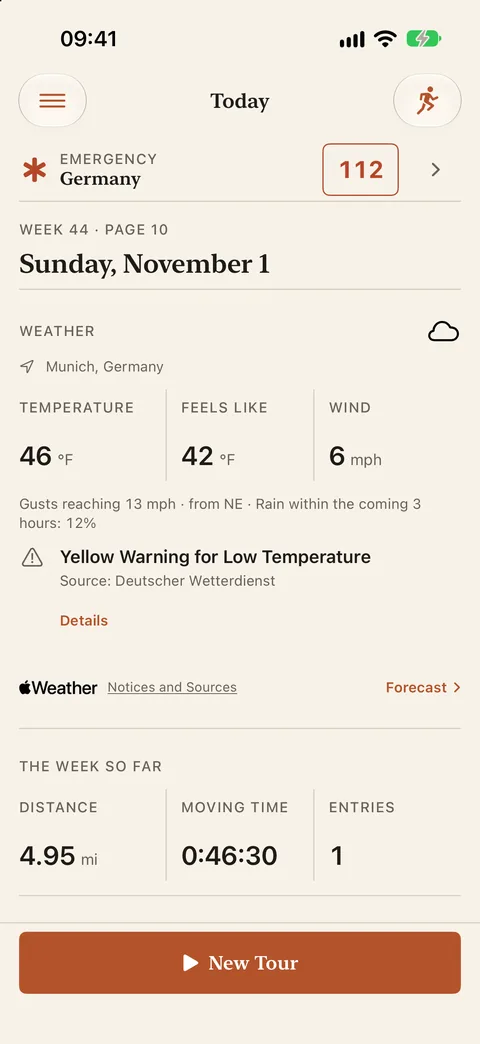
Date, weather, the week so far, your last activity and your goals as progress lines. Below that: “New tour”.
The strip at the top of every page shows mountain rescue and the emergency number of the country you are in, offline. Plus all services, your position to read out and “On the phone: …”. The app never dials by itself. If you don’t need the strip, hide it under Settings, Emergency numbers.
Now, next hour, 24 hours with a rating, 7 days, sun and moon, alerts. Hints per sport: wind and gusts for cycling, heat and UV on foot, thunderstorms for everyone. While recording, the weather sits briefly above your pace; a tap opens the forecast.
Distance, moving time, ascent, active energy or count. Per week, month or year, optionally for one sport only, such as 100 km of road cycling a month.
Week, month and year compared with the previous year, personal bests, filter by sport. After saving, a summary with up to four highlights.
All entries as a timeline, with search, sorting and filters. Tags and color marks in red, orange, yellow, green, blue, purple or gray.
In the detail view, every section explains how the value came about: map with km marks, line by pace, altitude or heart rate, bars per kilometer, elevation profile, heart rate, steps, energy, zones, load.
For road bike and mountain bike, the app estimates power from speed, grade, your weight and the adjustable bike weight. Plus climbs rated category 4 to HC and VAM.
On foot, the app calculates sunset and turnaround time offline and reminds you 15 minutes ahead, also on the Watch. The way back follows your own track and vibrates when you stray more than 50 m.
Every 1, 2, 3, 4, 5 or 10 kilometers or miles: distance, time, average and heart rate. Plus the “Announce” button. Off by default.
Start, pause and finish on your wrist, live values and heart rate. “Last in the Journal” widget in five sizes, Live Activity with Dynamic Island, Siri: “Start OneTwo Sports”.
GPX and TCX (heart rate only after confirmation), share an image with the map. iCloud sync optional; you decide on conflicts. Health data never goes to iCloud.
One widget, “Last in the Journal”, in five sizes, plus a Live Activity and the Dynamic Island while you record. All in the app’s color scheme, with no heart rate and no coordinates on the lock screen. Drawn after the app’s widget views.
The duration keeps counting in the system; while paused it stands still. If the app stays silent for too long, the state reads “Interrupted”. With “Save battery” the Live Activity updates less often. Example values are made up.
More precise with heart rate, fully usable without. Every formula is disclosed in the “How we calculate” help.
From the Watch, from heart rate, or estimated from pace, grade and weight. The detail view tells you which method was used.
Your last 7 days against the 28 days before. Without heart rate, rate your effort from 0 to 10 after each activity.
Enter weight, age, resting and maximum heart rate yourself, or take them from Apple Health with “Use Health Heart Rate”.
Calories, zones, load, power, VAM, Minetti: every formula is explained in the help and under the respective section.
Estimates for guidance. Not a medical device.
Trends as calm lines instead of leaderboards. Goals show progress and “reached”, nothing nags.
Longest distance, biggest ascent, fastest pace, filterable per sport.
After saving, up to four highlights, such as a new personal best or a goal reached.
Distance, moving time, ascent, active energy or count. Week, month or year, also just for road cycling or hiking.
Drag the slider: when should you turn around on foot to be back before sunset?
Example at 4 km/h. No navigation: the app only shows your own track. If you need navigation to places, the companion app Waymark has it.
The built-in camera opens without leaving the recording. Later you find all photos in the entry’s gallery.
Two devices, two versions: you decide. Try it.
Evening run
Note: rain from kilometer 4
Evening loop by the river
Color mark: blue · Tag: road bike
Two switches, off by default: “Use Health Heart Rate” and “Log to Health”. The workout lands in Health with route, pauses, distance, elevation gain and calories.
Off by default. Sync is independent of your device backup.
Heart rate, calories, body data and bike weight are excluded from the app’s iCloud sync. Device backups may include them.
No ads, no analytics, no developer server.
In the background only during a recording. For the weather, your location goes to Apple Weather rounded to about one kilometer; this can be turned off.
The numbers for 119 countries live in the app. Your iPhone determines the country offline; nothing is stored or sent.
Heart rate and calories only after confirmation. The share image never contains health data.
More in the privacy policy.
OneTwo Sports does not want to be a social network. It is your journal.
No account, no developer server, no ads, no analytics SDKs. Your routes stay on your devices and, only if you want, in your own iCloud.
By comparison: According to vendor information (as of November 2026): Strava, Komoot and adidas Running require an account and store data on their own servers.
€2.99 once for iPhone and Apple Watch. No premium tier, no in-app purchases, no features behind a gate.
By comparison: According to vendor information (as of November 2026): With Strava, Komoot and adidas Running, goals, power estimates or maps are partly behind a subscription.
No leaderboards, no kudos, no push campaigns. An interface like a notebook, trends as lines, goals as quiet progress bars.
Road bike and mountain bike get a watt estimate without a sensor. Under every value you find “How it is calculated”: formula, inputs, accuracy.
By comparison: According to the comparison table, disclosed formulas are not listed in the vendor information of the six other apps.
Turnaround time and sunset calculated offline, way back on your own track, emergency numbers for 119 countries stored locally. The app never dials by itself; iOS asks before every call.
By comparison: Offline emergency numbers are not listed in the vendor information of the six compared apps.
For winter there is OneTwo Ski with slopes, lifts and run detection. If you want to navigate to places on the go, take the companion app Waymark with 25 sports. OneTwo Sports remains the training journal for summer.
OneTwo Sports next to three summer and three winter apps.
| OneTwo Sports | SlopesWinter | Ski TracksWinter | SkilineWinter | StravaSummer | KomootSummer | adidas RunningSummer | |
|---|---|---|---|---|---|---|---|
| Price and privacy | |||||||
| Price | €2.99 one-time | Subscription (Premium) | Subscription | free | Subscription (Premium) | Subscription + map purchases | Subscription (Premium) |
| Works without an account | ✓ | ✗ | ✓ | ✗ | ✗ | ✗ | ✗ |
| Data stays on the device, no vendor server | ✓ | ✗ | ✓ | ✗ | ✗ | ✗ | ✗ |
| No ads, no analytics or tracking SDKs | ✓ | ? | ? | ? | ? | ? | ? |
| Optional iCloud sync, you resolve conflicts | ✓ | own cloud service | ✗ | own cloud service | own cloud service | own cloud service | own cloud service |
| Sports and detection | |||||||
| Sports with their own metrics | 7: walking, hiking, Nordic walking, jogging, mountain bike, e-bike, road bike | Ski, snowboard | Ski, snowboard | Ski | 30+, generic | about 10, outdoor | Running, walking, cycling |
| Estimated power in watts without a sensor (bike) | ✓ | – | – | – | ◐subscription | ✗ | ✗ |
| Way back along your own track and turnaround time before sunset | ✓ | – | – | – | ✗ | ◐plan return | ✗ |
| Safety | |||||||
| SOS emergency numbers for 119 countries, offline | ✓ | ✗ | ✗ | ✗ | ✗ | ✗ | ✗ |
| Analysis and fitness | |||||||
| Goals and season or year review | ✓ | ◐subscription | ✓ | ✓ | ◐subscription | ✗ | ✓ |
| Track coloured by speed, altitude or heart rate | ✓ | ✓ | ✓ | ✗ | ◐ | ? | ? |
| Photos with position and heading on the map | ✓ | ◐no heading | ✗ | ✗ | ◐no heading | ◐no heading | ◐no heading |
| Apple Health: workout with route and calories | ✓ | ✓ | ✓ | ✗ | ✓ | ✓ | ✓ |
| Formulas disclosed (“How we calculate”) | ✓ | ✗ | ✗ | ✗ | ✗ | ✗ | ✗ |
| On the go | |||||||
| Weather with forecast in the app | ✓ | ? | ? | ? | ◐after the fact | ✓ | ? |
| Apple Watch | ✓ | ✓ | ✓ | ✗ | ✓ | ✓ | ✓ |
| Widgets and Live Activity | ✓ | ✓ | ? | ✗ | ◐ | ◐ | ? |
| Voice announcements | ✓ | ? | ✗ | ✗ | ✓ | ✓navigation | ✓ |
| Export as GPX/TCX | ✓ | ✓ | ✓ | ✗ | ✓ | ✓ | ✓ |
Legend: ✓ included · ◐ partly or subscription only · ✗ not listed in the vendor information (does not mean the feature is missing) · – not applicable to this app · ? no reliable information
As of November 2026. Sources: publicly available vendor information, App Store listings and vendor websites, retrieved in November 2026. What is not mentioned there is marked “✗”, even if the app may offer it. The selection of apps is not a rating or purchase recommendation. Please report errors or changes to support@onetwoapps.com; I will correct them promptly. Prices and features may change. Slopes, Ski Tracks, Skiline, Strava, Komoot and adidas Running are trademarks of their respective owners. OneTwoApps is not affiliated with these providers.
One-time · No subscription · No in-app purchases · No ads
You pay once and train without running costs. The price in the App Store at launch applies. Category: Health & Fitness.
A fitness app for summer sports: walking, hiking, Nordic walking and jogging on foot, plus mountain bike, e-bike and road bike. On your home screen it is called “12 Sports”.
Both have merged into OneTwo Sports. OneTwo Running was the app’s name during development; the cycling sports come from OneTwo Bike. There is now one app with one journal and one price.
No. The iPhone records everything. With a Watch you control start, pause and finish from your wrist, see live values and get heart rate and calories from the watch. Distance is always measured by the iPhone.
No, it estimates it. For road bike and mountain bike, the app calculates from speed, grade, your weight and the bike weight. Bluetooth sensors and pedal cadence are not supported. There is no estimate for e-bikes.
No. The strip at the top of the app shows the numbers for mountain rescue and emergency services of the country you are in, plus your position to read out. You tap, iOS asks, you confirm. The numbers for 119 countries are stored offline in the app.
Apple Fitness often shows total calories including resting energy; OneTwo Sports shows active energy only.
No. Calories, heart rate zones, load and power are estimates for guidance.
No. The way back only shows your own track, without turn instructions or route planning. Navigation to places is offered by the companion app Waymark.
Not its own. Recording, way back, sunset and emergency numbers work without a network. For the map you can download offline maps in Apple Maps.
Twelve: English, German, French, Spanish (Spain and Mexico), Japanese, Chinese (Simplified and Traditional), Italian, Korean, Portuguese (Brazil) and Dutch. The app follows your iPhone’s language; under Settings, Look, Language you can pick another one. Voice announcements, the widget and the Apple Watch then use that language too. If your language is not supported, the app appears in English. All translations other than English and German are machine-made.
From Apple Weather (WeatherKit). The app sends your location rounded to about one kilometer. The weather at the start is saved per activity. The “Weather” switch can be turned off.
Location for the route, weather and the emergency strip; Motion for steps and altitude; Camera for photos; Health only with the two switches; Notifications for the turnaround time. Only location is required.
Yes, as GPX or TCX. Heart rate and calories only if you confirm. Plus an image with the map for sharing.
There is no date yet. This page will be updated when there is.
